Skip Navigation Links.
Collapse DriveHQ Online HelpDriveHQ Online Help
Welcome to DriveHQ Cloud IT Service
Getting started with DriveHQ
Expand <span style='cursor:hand' id='spnode_value101' onclick="SetNode('spnode_value101');">   Using DriveHQ Web</span> Using DriveHQ Web
Expand <span style='cursor:hand' id='spnode_value14600' onclick="SetNode('spnode_value14600');">   Group Account Management</span> Group Account Management
Expand <span style='cursor:hand' id='spnode_value14700' onclick="SetNode('spnode_value14700');">   Cloud Drive Mapping</span> Cloud Drive Mapping
Collapse <span style='cursor:hand' id='spnode_value15000' onclick="SetNode('spnode_value15000');">   Using DriveHQ Client Software</span> Using DriveHQ Client Software
Expand <span style='cursor:hand' id='spnode_value76' onclick="SetNode('spnode_value76');">   FTP Hosting Service</span> FTP Hosting Service
Expand <span style='cursor:hand' id='spnode_value19900' onclick="SetNode('spnode_value19900');">   Email Hosting Service</span> Email Hosting Service
Expand <span style='cursor:hand' id='spnode_value65' onclick="SetNode('spnode_value65');">   Web Hosting Service</span> Web Hosting Service
Expand <span style='cursor:hand' id='spnode_206' onclick="SetNode('spnode_206');">   File Drop Box</span> File Drop Box
Expand <span style='cursor:hand' id='spnode_value87' onclick="SetNode('spnode_value87');">   Partnership Programs</span> Partnership Programs
Expand <span style='cursor:hand' id='spnode_value210' onclick="SetNode('spnode_value210');">   Mobile Access</span> Mobile Access
Expand <span style='cursor:hand' id='spnode_value21000' onclick="SetNode('spnode_value21000');">   Advanced Features and Services</span> Advanced Features and Services


DriveHQ Team Anywhere: Remote Desktop, Remote Access, Remote Assistance
DriveHQ's CameraFTP Cloud Recording Service


Tutorial Videos
Service Manual
Support Forum
Customer Support

EmailManager Account Setting and Options


From DriveHQ Email Manager main screen, click on the Options button in the toolbar, and the screen "DriveHQ Email Manager - My Options" will pop up:
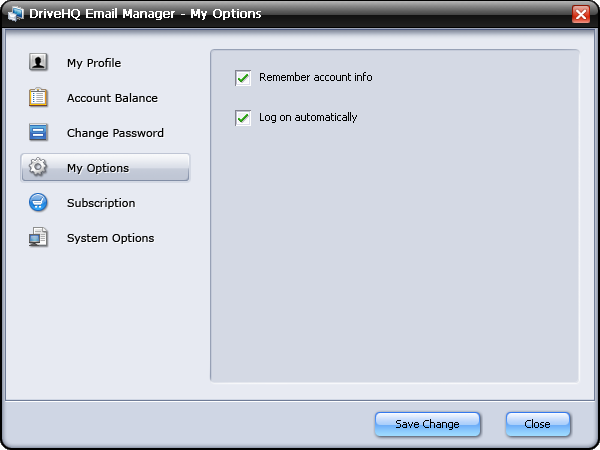
By default, DriveHQ Email Manager remembers user logon info and automatically signs in. This makes it very convenient for users.

Other settings include:

  • My Profile: you can view or edit your DriveHQ account profile;
  • Account Balance: check your DriveHQ account balance; incl. cash balance, max emails allowed and number of emails in your account;
  • Change Password: change your DriveHQ account password;
  • Subscription: It is included in all service plans for businesses.
  • DriveHQ Email Backup Service (using DriveHQ Email Manager 3.0) is already included in all business service plans. Using this feature will not increase your cost.

    Free service users can also use this feature, but it can back up 1000 emails and 50 contacts only. If you need to back up more emails or contacts, you can order any business service plan, including our low-cost Business Basic plan.

  • System Options: You can disable the application from automatically start when you log on to Windows; you can also configure it to automatically minimize the application window if it is started automatically.